
Buying a 65 percent Mechanical Keyboard Hot Swap Switches and Kit Costs
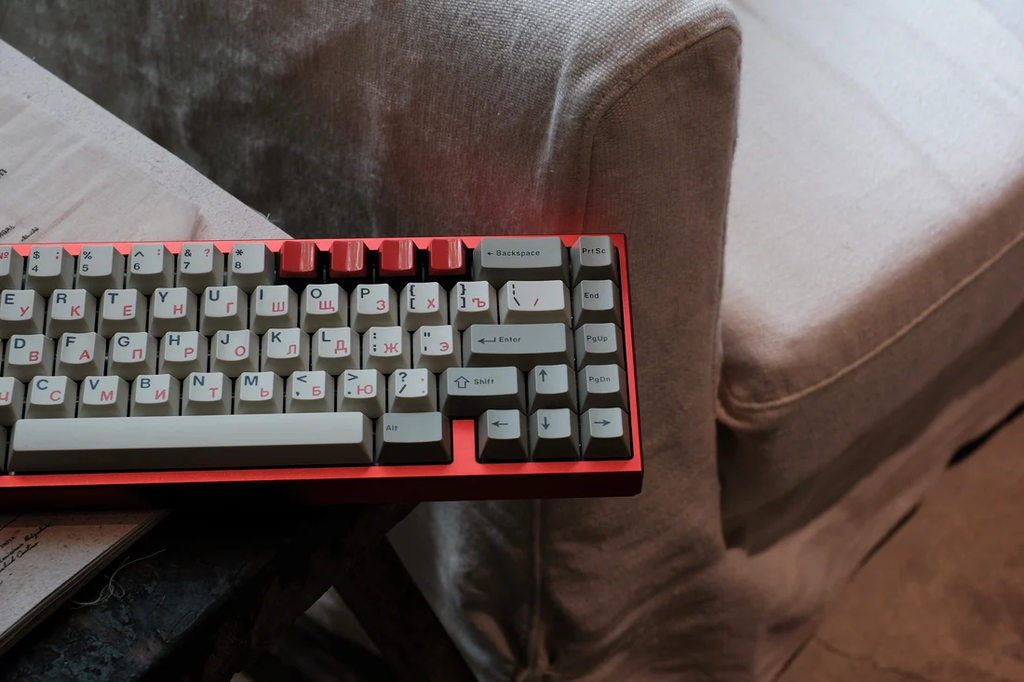
A 65% mechanical keyboard can be compact without feeling restrictive, provided its key arrangement and customization options match the way you use it. The important buying questions are not just size and color: switch feel, socket support, firmware, and whether the listing is a complete keyboard or a kit all matter.
Some 65% products ship assembled and ready to type; others require separate switches, keycaps, or assembly. A low headline price does not always represent the full build cost. Browsing a 65 keyboard collection can help clarify whether a listing includes switches, keycaps, and other necessary parts.
This guide uses UniKeys products such as Kraze 65, GDK Lab KV1-65, and compatible component examples to make those checks concrete. Kraze 65 is listed as an extras pre-order; confirm the selected listing’s current order status before purchasing.[UK1]
Why Choose a 65 percent Mechanical Keyboard
What Makes the 65 percent Layout Popular
The main advantage of a 65% layout is a compact arrangement that usually retains dedicated arrows and several navigation keys. Many examples have roughly 66–68 keys, but the percentage is an approximate layout category and key counts vary.
Unlike a typical 60% keyboard, a 65% layout includes dedicated arrow keys and usually a small column of additional keys, such as Delete, Home, Page Up, or Page Down. These controls make everyday navigation easier without requiring as many function-layer shortcuts.
Kraze 65 illustrates why kit contents matter: its listing says the PCB is included only if purchased, and switches and keycaps are separate. Review the chosen case, plate, PCB, and other components before calculating the cost of a working keyboard.
Who Should Consider a Compact Mechanical Keyboard
A 65% mechanical keyboard suits people who value desk space but still use arrow keys regularly.
Gamers: A narrower keyboard can leave more room for mouse movements, especially in first-person shooters.
Writers and students: Dedicated arrow keys make it easier to edit documents and navigate text.
Programmers: The compact layout works well for coding, although users who frequently press F1–F12 may prefer a 75% keyboard.
Remote workers: A smaller keyboard can help keep a home office organized and is easier to carry between workspaces.
If you regularly enter numerical data or rely on a full function row, a larger layout may be more convenient.
Which Mechanical Switches Are Best for a 65 percent Keyboard
What Is the Difference Between Linear Tactile and Clicky Switches
Mechanical switches determine how individual keys feel and sound when pressed. The three common categories are linear, tactile, and clicky.
| Switch type | Typing feel | Sound profile | Suitable for |
| Linear | Smooth movement without a tactile bump | No click mechanism; volume depends on the build[UK2] | Gaming and fast, consistent keystrokes |
| Tactile | A noticeable bump during the keystroke | No dedicated click; volume depends on the build | Typing, programming, and mixed use |
| Clicky | A tactile bump with an intentional click | Generally louder | Users who enjoy distinct auditory feedback |
Linear switches are often favored by gamers because their consistent movement feels predictable during repeated key presses. Tactile switches provide feedback that some typists find helpful when entering long passages of text.
Clicky switches can make typing feel more distinctive, but their sound may be distracting in shared offices or during calls.
These are general tendencies rather than strict rules. Spring weight, actuation force, lubrication, keyboard construction, and keycap material also influence how a switch feels.
How Should You Choose Switches for Gaming and Typing
Start with your primary activity, then consider the environment in which you use your keyboard.
For a current UniKeys linear example, CHERRY MX2A Black provides uninterrupted movement and is listed with 60 g operating force. Compare the resistance as well as the mechanism; linear movement does not guarantee faster gaming input.
For tactile feedback, HMX K01 offers a small bump and HMX Firecracker offers a P-shaped bump. Neither is presented as a silent switch; for shared spaces, assess the complete keyboard’s sound.
When possible, test a switch sample before buying. Online descriptions can explain the mechanism, but personal comfort is difficult to judge from specifications alone.
What Keycaps and Build Materials Should You Look For
PBT vs ABS Keycaps Which Is Better for Everyday Use
Keycaps affect surface texture, durability, appearance, and typing feel. PBT and ABS are two widely used plastics.
PBT keycaps generally have a firmer texture and tend to resist developing a shiny appearance from regular use. ABS keycaps can feel smoother and are common in both budget and premium keyboards. Some ABS keycaps develop a polished surface over time, particularly on frequently used keys.
Neither material automatically guarantees better typing performance. Manufacturing quality, thickness, surface finish, and legend construction also matter.
For a concrete PBT option, TUT C.C.C.C is listed in Cherry profile with 1.6 mm thickness and five-sided dye-sublimation. Check its included-key diagram for your exact 65% layout; neither PBT nor thickness guarantees a particular sound or typing result.
How Do the Case Material and Keyboard Mount Affect Typing Feel
The case and internal construction influence weight, sound, and stability.
Plastic cases are often lighter and can help keep a keyboard affordable. Aluminum cases generally feel more substantial and may provide a premium appearance, although they add weight and can increase cost.
Mounting systems also matter. A firmer plate-mounted design may produce a more rigid typing experience, while some gasket-mounted designs allow more movement and can soften the feel of bottoming out.
There is no universally best construction. Consider the typing feel you prefer rather than choosing by material alone.
Does RGB Lighting Matter When Choosing a Keyboard
RGB lighting lets you customize colors, brightness, and lighting effects. It can help distinguish keys in dim environments and personalize your setup.
However, lighting is primarily an aesthetic and convenience feature. If you work in a bright office or prefer a simple design, a keyboard with adjustable white backlighting or no lighting may be sufficient.
For wireless models, check whether lighting settings affect battery life and whether the keyboard allows you to turn the lights off completely.
What Features Make a 65 percent Mechanical Keyboard More Versatile
Is Hot Swap Support Important for Beginners
Hot-swap support allows compatible mechanical switches to be removed and replaced without soldering. This makes it easier to experiment with different switch types or replace a faulty switch.
For beginners, it can be a useful feature because you do not have to commit permanently to the original switches. However, hot-swap sockets support specific switch formats, so compatibility still matters.
Kraze 65 lists MX, HE, and EC PCB options. Choose the electrical platform first and verify the compatible switches: these PCB formats are not interchangeable merely because a listing offers hot-swap support.
If you are satisfied with the stock switches and do not expect to modify your keyboard, a non-hot-swappable model may offer better value.
Should You Choose a Wired or Wireless Keyboard
The right connection depends on where and how you use your keyboard.
Wired keyboards are straightforward to set up and do not need battery charging. They can be particularly convenient for stationary gaming or desktop work.
Wireless models offer a cleaner desk and greater flexibility. Some support both Bluetooth and a dedicated 2.4 GHz wireless receiver, while others use Bluetooth alone. A 2.4 GHz connection is often preferred for responsive gaming, although actual performance depends on the device and implementation.
For a wireless keyboard, check battery capacity, charging method, operating-system compatibility, and whether it can connect to multiple devices.
If you regularly switch between a desktop, laptop, and tablet, multi-device support may be more useful than RGB lighting or other cosmetic features.
How Do Programmable Keys Layers and Software Improve Usability
A 65% layout omits the dedicated F1–F12 row, so many models use a function layer to access those commands. For example, holding Fn while pressing a number key may activate its corresponding function key.
Programmable software can make this arrangement more convenient. Depending on the model, you may be able to remap keys, create shortcuts, adjust lighting, or configure different layouts for work and gaming.
GDK Lab KV1-65 is listed with QMK/VIA support. Confirm the selected PCB, software version, and operating-system requirements, then check that you can configure the Fn layers used by your applications.
If you frequently use function keys for debugging, spreadsheets, or specialized applications, make sure their shortcuts are easy to access. Otherwise, a 75% layout with a dedicated function row may be a better fit.
How Do You Choose a 65 percent Mechanical Keyboard for Your Budget
Which Features Matter Most in a Budget 65 percent Keyboard
Compare the full build cost, rather than a low starting kit price. With a kit such as Kraze 65, the selected PCB, switches, keycaps, and any other separately required parts can change the total.
For everyday use, consider whether the keyboard supports your computer’s operating system and offers a convenient connection method. If you plan to type for long periods, pay attention to key wobble, stabilizer noise, and the overall feel rather than focusing solely on lighting effects.
A hot-swap PCB is worth considering if you expect to customize the keyboard later. However, it is not essential for everyone.
Also check the warranty, return policy, and availability of replacement parts. A lower purchase price may be less attractive if repairs or replacements are difficult.
Is a Customizable 65 percent Keyboard Worth the Investment
A customizable keyboard can be a worthwhile long-term purchase if you enjoy adjusting your setup. Replaceable switches, alternative keycaps, programmable layouts, and adjustable lighting let you adapt the keyboard as your preferences change.
For example, a user building a compatible MX hot-swap configuration could compare HMX K01 with WingTree Golden Apple V2 for different levels of tactile feedback. Check the selected switch version, quantity, and PCB compatibility before ordering.
Before paying extra, identify the features you will actually use. Customization adds flexibility, but it does not automatically improve typing comfort or productivity.
Use the following table to compare common layout choices before deciding which keyboard to buy.
| Feature | 65% keyboard | 75% keyboard | Full-size keyboard |
| Dedicated arrow keys | Yes | Yes | Yes |
| Dedicated function row | Usually no | Yes | Yes |
| Number pad | No | No | Yes |
| Desk footprint | Compact | Compact to medium | Large |
| Best suited for | Everyday use and compact gaming setups | Productivity and mixed use | Data entry and number-heavy work |
Check the Total Cost of a 65 percent Build
• Confirm whether the product includes a PCB, case, plate, stabilizers, cable, switches, and keycaps; these can be sold separately.
• Check socket compatibility and supported switch type before assuming “hot-swappable” means any mechanical switch will fit.
• If you use a nonstandard right Shift or bottom row, verify keycap kit coverage before purchasing a replacement set.
• Check firmware support and the ability to customize layers if your work depends on dedicated shortcuts.
Conclusion
The best 65% mechanical keyboard for your needs is the one whose layout and included components you fully understand before checkout. Hot-swap support and programmable layers can add flexibility, but they only help if they work with your preferred parts and applications.
Prioritize reliable connectivity, comfortable switches, clear compatibility information, and a realistic total build budget over decorative features you may rarely use.
FAQs
Are all 65 percent keyboards mechanical
No. The term 65% describes a keyboard’s approximate layout size, not its switch mechanism. Many 65% keyboards use mechanical switches, but compact keyboards can also use other switch technologies. Check the product specifications to confirm the switch type.
Can you replace the switches on a 65 percent mechanical keyboard
Yes, if the keyboard supports hot-swappable switches or if you are prepared to desolder and solder compatible switches. For most beginners, a hot-swappable model is the easier option. Always check switch compatibility before purchasing replacements.
Is a 65 percent mechanical keyboard good for office work
Yes, for many office tasks. Dedicated arrow keys make editing documents and navigating text convenient, while the compact layout saves desk space. However, users who frequently work with spreadsheets, numeric data, or function-key shortcuts may prefer a full-size or 75% keyboard.
Catalog review: Added concrete kit, switch and PBT examples while keeping the buying-guide structure. Corrected assumed kit inclusions, noise categories and MX/HE/EC compatibility.
Catalog review: Added concrete kit, switch and PBT examples while keeping the buying-guide structure. Corrected assumed kit inclusions, noise categories and MX/HE/EC compatibility.